What is a modern Service Desk system and what is it used for?
A Service Desk system is the command center for communication between the IT department and the rest of the organization. Its role is to organize tickets, automate workflows, and provide full visibility of all incidents in one place. As a result, even large, distributed teams can respond faster and more effectively, regardless of where employees are located.
That’s why the best ITSM Service Desk systems are now essential for any company that prioritizes digital stability and efficiency. In practice, such a solution combines service catalogs, knowledge bases, and configuration repositories, creating a coherent ecosystem for ticket handling and incident management.
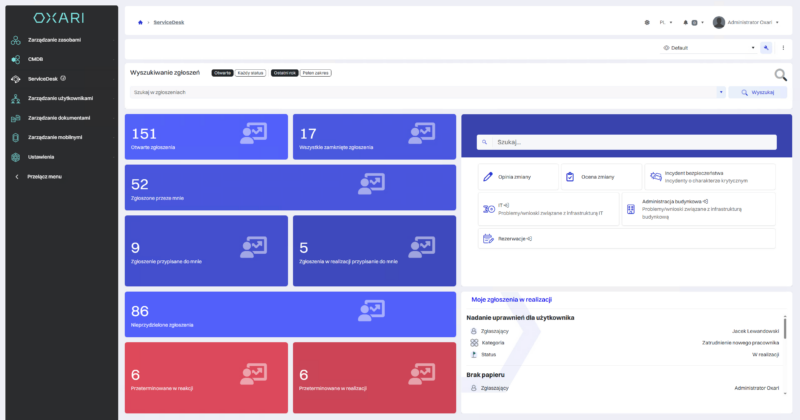
Platforms like OXARI ServiceDesk not only improve communication, but also help keep IT processes in order – eliminating the chaos that in large organizations can be costly in terms of both time and user trust.
Which Service Desk software is the best? Ranking criteria
Choosing the right IT service management tool is a decision that impacts the efficiency of the entire organization. To identify the best Service Desk software, we considered several key aspects that determine the quality and reliability of a system:
- ITIL alignment and process support – the system should support incident, change, problem, and IT asset management to ensure consistency across ITSM operations.
- Flexibility and customization – every company has its own processes, so it’s worth choosing a solution that can be easily tailored to your needs without having to program it yourself.
- Integrations and extensions – support for modules such as CMDB, task automation, remote support, or AI components is important.
- Security – a solid tool ensures access control, activity auditing, and compliance with data protection requirements.
- Usability and scalability – the system should be easy to use while also ready to grow with the organization.
A properly selected solution minimizes the risk of errors, improves communication within the IT team, and eliminates challenges that often cause the 5 most common Service Desk problems.
TOP 13 best Service Desk systems
Choosing the right Service Desk system is not only about functionality, but also about how well it matches your organization’s strategy and scale. Our list includes tools that best combine ITIL alignment, configuration flexibility, and process automation. Each of them has slightly different strengths – this ranking will help you select a solution that fits your real needs.
OXARI ServiceDesk
OXARI ServiceDesk is a Polish ITSM-class system, aligned with ITIL and certified by Pink Elephant. A key advantage on the local market is Polish-language support and an implementation team working in Polish, which makes communication, onboarding, and implementation projects significantly easier. It combines Service Desk, CMDB, Asset Management, andOXARI AI, which automates ticket handling and reduces response times. Thanks to local AI data models and flexible configuration, it works well in both public administration and the medical sector.
Benefits:
- Full ITIL alignment and Pink Elephant certification
- Flexible configuration and integration with CMDB and Asset Management
- Polish-language support and implementation team (service in Polish)
- Secure AI model, local data processing
- Cloud version available
- Relatively low costs
Challenges:
- Requires time for implementation and team training
Freshservice
Freshservice by Freshworks is a cloud ITSM solution that supports incident, problem, and change management. With intelligent task assignment automation, it helps IT teams respond faster and handle tickets more efficiently. The system offers an intuitive interface and mobile access, which works well in remote environments.
Benefits:
- Intuitive interface and mobile apps
- Self-service portal and knowledge base
- Advanced reporting and analytics
Challenges:
- No free plan
- Limited project management features
- Performance slowdowns may occur
Intercom
Intercom is a communication platform focused on customer interactions via email, chat, and social media. While it is not a full ITSM system, it supports message automation and user engagement analytics, making it a good choice for customer support teams.
Benefits:
- Automated messages and personalized communication
- Team collaboration tools
- Interaction analytics and reporting
- Multi-channel support
Challenges:
- No extensive ITSM module
- Focuses on communication rather than support processes
HubSpot Service Hub
HubSpot Service Hub is an AI-powered customer support platform built on CRM data. It combines ticket handling, process automation, and analytics, offering full visibility into customer interactions. The system stands out for scalability, integration with sales and marketing tools, and advanced real-time reporting.
Benefits:
- Omnichannel support and AI-based automation
- Ready-made reports and NPS/CSAT surveys
- CRM integration and customer data analysis
- Scalable 24/7 self-service
Challenges:
- High costs in advanced plans
- Limited functionality in the free version
- May be too complex for small businesses
Jira Service Management
Jira Service Management by Atlassian is an ITSM tool built for technical teams that need control over incidents, changes, and requests. It stands out for ITIL alignment, integration with Confluence, and the ability to automate processes in DevOps environments. With a flexible self-service portal, it speeds up user support.
Benefits:
- Self-service portal and knowledge base
- Full ITIL alignment and real-time SLA tracking
- Integration with Confluence and Atlassian tools
Challenges:
- Complex interface and difficult onboarding
- Occasional bugs and slowdowns
- Can overwhelm beginners with the number of tools
ServiceNow
ServiceNow is a comprehensive ITSM platform designed for large organizations. It enables full incident, problem, and IT asset management in a single environment. Extensive AI modules, virtual chatbots, and advanced automation make it one of the most powerful solutions in its class.
Benefits:
- Integrated incident and asset management
- Built-in AI and automation
- Flexible reports and fully configurable processes
- Omnichannel support
Challenges:
- No free plan and high costs
- High complexity and time-consuming implementation
- May run slower under heavy workloads
Zendesk
Zendesk for Service is a cloud customer service solution that can be adapted for an internal IT help desk. It offers simple setup, an efficient ticketing system, and an intuitive interface. Thanks to ready-made integrations, it enables fast launch of support processes without developer involvement.
Benefits:
- Easy implementation without coding
- Suitable for both customer support and internal teams
- 14-day free trial
Challenges:
- High price for small businesses
- Limited customization options
- Full functionality available only in higher-tier plans
ServiceDesk Plus
ServiceDesk Plus by ManageEngine is a comprehensive browser-based ITSM solution aligned with ITIL. It combines incident, problem, change, and asset management in a single environment. The cloud version reduces update-related issues and provides automatic patch deployment, making it a stable and secure platform for mid-sized and large companies.
Benefits:
- Integrated ITIL modules (CMDB, Asset, SLA, projects)
- Workflow automation and self-service portal
- Stability of the cloud version and fast updates
Challenges:
- Some modules require separate licenses
- Full ITIL configuration takes longer to implement
- Too many features for small organizations
HaloITSM
HaloITSM is a modern Service Desk system available as SaaS or on-premise, designed for full ITSM alignment. It combines a clear user portal with strong process automation and a robust CMDB, helping teams respond to incidents before they become critical.
Benefits:
- Self-service portal and a solid ticketing system
- Automated outage detection and SLA management
- High configuration flexibility
Challenges:
- More difficult integration with some APIs
- Advanced features take time to configure
- Many options may overwhelm new users
Matrix42
Matrix42 Service Desk supports communication between IT teams and users via a self-service portal, email, and an agent interface. It enables incident tracking, service level management, and ITIL-aligned workflow automation, ensuring full transparency of support operations.
Benefits:
- Ticket registration and automation for IT requests
- Defining service levels and categories
- Improved communication and email templates
Challenges:
- Longer learning curve
- Integrations with less common systems require customization
Alvao
Alvao Service Desk centralizes ticket handling and automates prioritization. Built on Azure OpenAI, the system analyzes requests, identifies risk patterns, and recommends preventive actions. With Microsoft Teams integration, it provides 24/7 user support.
Benefits:
- AI supports incident analysis and solution recommendations
- Automatic sorting and ticket assignment
- Virtual agent available 24/7 in Teams
Challenges:
- High implementation cost
- Less intuitive interface than competitors
- Infrequent and minor system updates
Zoho Desk
Zoho Desk is a Service Desk tool focused on user experience. It offers omnichannel support, robust automation, and performance analytics. Through integration with the Zoho ecosystem, it streamlines communication and reporting across different departments.
Benefits:
- Support for email, phone, chat, and social media
- Process automation and duplicate-ticket detection
- Detailed reporting and Zoho integrations
Challenges:
- Steep learning curve during implementation
- Limitations in the free plan
TrustIT
TrustIT is a Polish Service Desk system from the Atende Group, focused on ensuring business continuity and IT infrastructure security. It enables ticket monitoring, SLA analysis, and detailed reporting, supporting ongoing process optimization.
Benefits:
- Full SLA support and process documentation
- Root-cause analysis and service optimization
- Single point of contact for all IT tickets
Challenges:
- Less control with outsourced processes
- Potentially slower communication than with an internal IT department
Service Desk systems comparison – features and use cases (table)
| System / Criterion |
Workflow & automation |
Ticket categories / SLA |
Integrations & omnichannel |
Scalability / industries |
Costs & licensing model |
| OXARI ServiceDesk |
Advanced business rules, AI (OXARI AI) |
Full ITIL and SLA support |
CMDB, Asset Mgmt, AD, local integrations |
Large organizations, public sector, healthcare |
Cloud / on-premise, flexible subscription |
| Freshservice |
Automatic assignments and workflows |
Built-in SLAs and reporting |
Mobile app integrations, email |
Mid-sized and large IT teams |
Monthly subscription, no free plan |
| Intercom |
Message and notification automation |
SLA |
Email, chat, social media |
B2C customer support |
Subscription, depends on number of contacts |
| HubSpot Service Hub |
AI and ticket automation |
SLAs, NPS/CSAT surveys |
CRM, marketing, omnichannel |
Service companies and e-commerce |
High cost in premium plans |
| Jira Service Management |
DevOps automation, ITIL workflows |
Real-time SLA |
Confluence, Slack, Atlassian API |
IT and software houses |
Subscription / per user |
| ServiceNow |
Full automation and AI |
Comprehensive SLA / ITIL |
Integrations with ERP, HR, AI chat |
Large orgs, finance, enterprises |
High implementation costs |
| Zendesk |
Ticketing and support automation |
SLAs for external customers |
Email, chat, social, CRM |
Large customer service teams |
Subscription, higher Enterprise tiers |
| ServiceDesk Plus |
Automated routing and workflows |
Full ITIL and SLA |
CMDB, Asset, knowledge base |
Mid-sized and large IT organizations |
Cloud / on-premise, modular licensing |
| HaloITSM |
Strong ITSM workflows, CMDB |
SLA and incident management |
API, integrations with MS and Jira |
Mid-sized and large tech companies |
Subscription, SaaS plan |
| Matrix42 |
Ticket workflow automation |
Full SLAs and reports |
Email, portal, ERP |
Enterprises, public sector |
High implementation costs |
| Alvao |
AI (Azure OpenAI), priority automation |
SLAs and real-time reporting |
Integration with Teams and MS 365 |
Enterprises and public institutions |
Annual license, high cost |
| Zoho Desk |
Workflows and duplicate detection automation |
SLAs and quality monitoring |
Email, chat, social media |
SMBs and customer service centers |
Free plan + paid subscriptions |
| TrustIT |
Ticket and SLA monitoring |
Full reports and root-cause analysis |
Integrations with corporate systems |
Large orgs, IT outsourcing |
Service model, fixed fee |
Which Service Desk software should you choose for your organization? A mini guide
Choosing a Service Desk system is not only a technology decision, but also a strategic one. Every company operates at a different pace, has different priorities, and a different level of IT process complexity. The mini guide below will help you pick a solution best matched to the nature of your organization – from large institutions to startups that need immediate rollout.
For large organizations and public institutions
In highly complex environments, ITIL-based systems work best – offering process transparency, data security, and full automation. OXARI ServiceDesk, and to a slightly lesser extent ServiceNow, are leaders in this segment. They provide extensive CMDB, Asset Management, and AI modules that support ticket analysis. OXARI additionally offers a local data model and Polish-language support, which makes it especially attractive for public administration and the medical sector.
For multi-branch companies
If your organization operates in many locations, you need a solution that enables centralized ticket management while maintaining flexible processes. HaloITSM and ServiceDesk Plus support distributed team synchronization and workflow automation. They offer cloud options, ERP and DevOps integrations, and real-time reporting – ideal for organizations with complex operational structures.
For companies that need a quick implementation
Not every organization needs a months-long implementation project. If time and ease of use are priorities, choose Freshservice, Zoho Desk, or Zendesk. These solutions can be set up and used almost immediately. They provide self-service portals, a simple ticketing system, and a user-friendly interface. In smaller companies, a subscription plan with core ITSM capabilities is often enough to noticeably improve ticket handling quality.
For organizations with a high ticket volume
In organizations where requests come in from many channels and are often duplicated, centralizing the entire process is crucial. OXARI ServiceDesk stands out here in particular – bringing all communication channels into one place and providing a complete activity history and a transparent workflow. With integration to Asset Management and CMDB, it helps analyze incident sources and implement long-term solutions. The IT team gains a clear division of responsibilities, while users get faster and more predictable support.
Modern Service Desk software delivers far more today than just IT department support – it is the foundation of an organization’s digital transformation. It enables task automation, better reporting, and faster problem resolution across every department in the company. As you can see, among the available solutions, OXARI ServiceDesk clearly stands out. Its versatility, ITIL alignment, and scalability make it an ideal choice in almost any environment. It is a system that grows together with the organization – from local structures to complex enterprise environments.
FAQ – most common questions about choosing Service Desk software
Not sure which system will work best in your company? Below are answers to the most frequently asked questions about selecting and implementing Service Desk software.
What Service Desk software is best for mid-sized and large companies?
For larger organizations, ITIL-aligned solutions work best – such as OXARI ServiceDesk – as they combine automation, scalability, and full control over IT processes.
What should you consider when choosing a Service Desk system?
The most important criteria are ITIL alignment, the ability to integrate with other systems, configuration flexibility, and data security – only then does the system truly support organizational growth.
Does a Service Desk have to be ITIL-aligned?
It doesn’t have to, but ITIL alignment ensures structured processes and full transparency in ticket handling, which in practice translates into stability and predictability in IT operations.
Do Polish companies need local support?
Polish companies do not always need local support, but in regulated sectors – such as public administration or healthcare – a local team and in-country data processing increase security and compliance.
How much does it cost to implement and maintain a Service Desk?
The cost depends on the number of users, the deployment model (cloud or on-premise), and the scope of features. Fortunately, modern systems allow you to get started without lengthy and expensive implementations.