What is ITSM and which processes does it cover?
ITSM (IT Service Management) is a structured and measurable approach to managing IT services in alignment with an organization’s business objectives. It extends far beyond technical support and covers the entire service lifecycle, from design and implementation to ongoing maintenance and continual improvement.
Modern ITSM software provides a centralized platform for process management, workflow automation, and reporting. This enables IT teams to operate in line with frameworks such as ITIL, improving the predictability and quality of service delivery. For this reason, the best ITSM systems support key operational areas, including:
- incident management,
- problem management,
- change management,
- service request fulfillment.
This approach helps organizations improve operational efficiency and maintain greater control over their IT environment.
Which criteria should you consider when choosing ITSM software?
Selecting an ITSM platform is a strategic decision. Too many organizations end up with overlapping tools, low user adoption, and rising maintenance costs. Before deciding which ITSM solution to implement, evaluate the following key criteria.
- Consolidation instead of tool sprawl – Can the platform replace your existing ticketing, asset management, and change management systems, or will it simply add another layer to your IT ecosystem?
- Usability and ease of use – Advanced functionality is valuable, but will excessive complexity hinder day-to-day operations rather than improve them?
- Customization capabilities – Make sure you can configure workflows, SLAs, and forms without costly custom development.
- Flexibility and vendor independence – Ensure you retain control over your data and have the freedom to migrate to another platform in the future if needed.
Taking these factors into account will help minimize the risk of investing in a solution that fails to meet your organization’s long-term needs.
Ranking of the 9 best ITSM systems
In previous articles, we explored what a ranking of the best Asset Management systems should include. This time, we have analyzed nine ITSM solutions. We assessed them based on their configuration options, integrations, and ability to support real-world IT processes rather than relying solely on empty marketing claims. See which platforms are best suited to your company’s needs.
OXARI ITSM
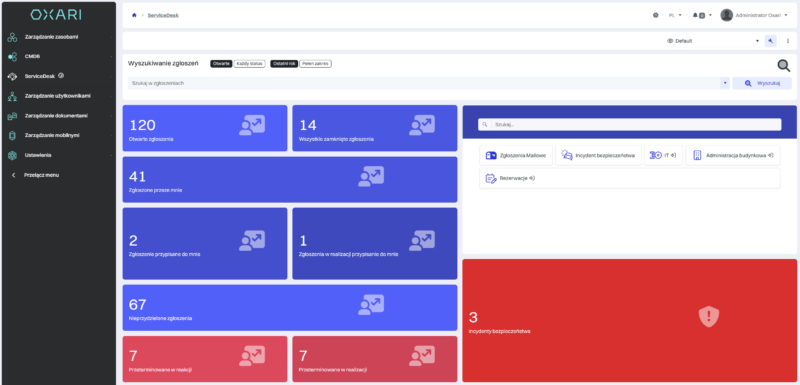
OXARI is an advanced Polish ITSM system that provides a comprehensive platform for managing IT services in a structured, measurable manner aligned with an organization’s actual requirements. Through OXARI ServiceDesk, the system combines ticket management with asset management and a configuration management database (CMDB), giving IT teams complete visibility into the relationships between incidents, changes, and infrastructure components.
The solution has been designed to support flexible process modelling, SLA rule definition, and knowledge centralization within a single environment. The platform can scale alongside the organization and be extended to cover additional business areas while maintaining operational transparency and control over service quality.
Key features:
- incident, change, and service request management,
- built-in CMDB and IT asset inventory,
- workflow automation and SLA performance monitoring,
- self-service portal with a knowledge base,
- operational reporting and support for process compliance.
ServiceNowITSM
ServiceNow ITSM is an extensive platform used primarily by large organizations with complex process structures. The solution has evolved from a traditional ITSM system into a broad service management ecosystem that also covers areas such as HR and security.
The system is cloud-based and provides extensive configuration options for processes, forms, and workflows. It is particularly well suited to organizations where scalability, integration with multiple third-party systems, and centralized service management on a single platform are key requirements.
Key features:
- incident, change, and release management,
- service request management and an extensive service catalog,
- CMDB and IT asset management,
- advanced reporting and analytics.
Jira Service Management
Jira Service Management, developed by Atlassian, successfully combines a traditional ITSM approach with DevOps practices. It is particularly effective in organizations that already use Jira Software, as it enables service requests to be linked directly to the work of development teams.
The platform is primarily available as a cloud solution, although a Data Center version is also offered for on-premises environments. It provides flexible workflows and integrations that support collaboration between IT and DevOps teams within a single ecosystem.
Key features:
- self-service portal,
- incident management with DevOps integrations,
- asset and dependency management,
- knowledge base and self-service capabilities,
- automation, alerting, and on-call scheduling.
Freshservice
Freshservice is an ITSM solution developed by Freshworks with a strong focus on fast deployment and ease of use. The cloud-native platform is often selected by organizations that need to launch an ITSM system quickly without carrying out extensive configuration.
The system incorporates AI-powered automation features that support ticket classification and recommend potential solutions. Its clear and intuitive interface also helps drive user adoption across IT teams.
Key features:
- IT Asset Management and IT Operations Management,
- automated ticket assignment and categorization,
- ESM capabilities for HR and finance teams,
- unified CMDB,
- omnichannel support.
ManageEngine ServiceDesk Plus
ManageEngine ServiceDesk Plus, developed by Zoho Corporation, combines ITSM, asset management, and CMDB capabilities within a single platform. The system is available both as a cloud-based solution and as an on-premises deployment, allowing organizations to select a model suited to their infrastructure.
The solution is based on ITIL-aligned processes and supports service request management not only within IT but also across other departments. Its configurable interface and extensive modules help centralize service delivery within a single environment.
Key features:
- end-to-end incident and service request lifecycle management,
- asset and relationship management within the CMDB,
- self-service portal, live chat, and mobile application,
- change and release management with configurable workflows,
- virtual agent and AI-powered capabilities.
Matrix42 ITSM
Matrix42 ITSM is a modern IT service management platform focused on flexibility, automation, and artificial intelligence. It enables faster ticket resolution and reduces the amount of manual work performed by helpdesk teams. Matrix42 can be deployed in various cloud environments or on premises.
The system stands out for its ability to launch core ITSM processes quickly and scale as an organization’s requirements grow. The platform also supports intelligent automation through AI Your Way, which can accelerate ticket resolution and help prevent incidents proactively.
Key features:
- comprehensive incident, change, and service request management,
- ITSM workflows and process automation,
- integration with CMDB and Asset Management,
- flexible deployment model, including public cloud, private cloud, and on-premises options,
- AI-powered self-service and automation capabilities.
Zoho Assist
Zoho Assist is a remote support and unattended access solution used by IT teams, helpdesks, and managed service providers. The cloud-based platform enables secure connections to computers, servers, and mobile devices without requiring a complex installation process on the user’s side.
The system offers broad compatibility and supports Windows, macOS, Linux, Android, iOS, and ChromeOS environments. It is particularly useful when rapid ad hoc support sessions and permanent unattended access to devices are required.
Key features:
- on-demand remote support without client-side installation,
- unattended access to devices and servers,
- TLS 1.2 and AES 256-bit encryption,
- diagnostic tools and multi-monitor navigation,
- file transfer, session recording, and auditing.
NinjaOne
NinjaOne is a unified platform that combines endpoint management with ITSM capabilities. The solution focuses on IT operations automation and real-time infrastructure monitoring, reducing the need to use multiple separate tools.
The system provides centralized visibility into assets, events, and tickets through a single console. By integrating monitoring with ticket management, it enables IT teams to respond to incidents proactively and automatically enforce SLA rules.
Key features:
- automated ticket creation and escalation,
- endpoint, network, and application monitoring,
- integration of patch management with ITSM workflows,
- self-service portal with a knowledge base,
- full mobile support for IT teams.
Spiceworks
Spiceworks is a free helpdesk and network monitoring tool designed primarily for system administrators and smaller IT teams. The platform is cloud-based and provides basic ITSM capabilities without licensing costs.
The solution combines ticket management with hardware inventory and service monitoring. It is well suited to organizations looking for a straightforward system that centralizes IT support and asset oversight.
Key features:
- ticket management across multiple channels,
- service and infrastructure monitoring,
- software license compliance tracking,
- custom report generation,
- unauthorized software detection.
ITSM system comparison – which solution is best suited to each type of organization?
The choice of an ITSM platform should be based not on the tool’s popularity, but on the organization’s process requirements, infrastructure scale, and expected level of automation. Tool consolidation capabilities, configuration flexibility, and vendor independence are also important considerations. The comparison below shows the environments in which each system is likely to perform best.
| System |
Small and medium-sized businesses |
Large organizations |
Organizations with complex IT environments |
Tool consolidation |
Configuration options |
Autonomy |
| ServiceNow ITSM |
Limited suitability due to high complexity |
Very good |
Very high |
High |
Very high |
Medium – cloud-based model |
| Jira Service Management |
Good, particularly for IT and DevOps teams |
Very good |
High |
Medium |
High |
High – cloud or Data Center |
| Freshservice |
Very good |
Good |
Medium |
Medium |
Medium |
Medium – cloud-native |
| ManageEngine ServiceDesk Plus |
Good |
Very good |
High |
High |
High |
High – cloud or on-premises |
| Zoho Assist |
Good for remote support |
Complementary solution |
Complementary solution |
Low – specialized tool |
Medium |
Medium |
| NinjaOne |
Very good |
Very good |
High |
Very high – RMM and ITSM |
High |
Medium |
| Spiceworks |
Very good for budget-conscious organizations |
Limited |
Low |
Low |
Low |
Medium |
| Matrix42 ITSM |
Good |
Very good |
Very high |
High |
Very high |
High |
| OXARI ITSM |
Very good |
Very good |
Very high |
Very high – ITSM, CMDB, and Asset Management |
Very high |
High |
When should you implement ITSM, and what problems does it solve?
ITSM is worth considering when ticket volumes are increasing, processes are fragmented, and reporting takes more time than resolving issues. Unclear priorities, difficulties in collaboration between IT and other departments, and recurring incidents are all signs that the organization needs a consistent service management model.
ITSM brings structure to team operations, introduces measurable performance indicators, and standardizes the handling of incidents, changes, and requests. It improves coordination between IT and development teams, supports knowledge sharing, and enables faster responses to major outages. Self-service capabilities and clearly defined processes increase service efficiency while also improving the day-to-day user experience.
In larger organizations, service management, full asset visibility, and insight into infrastructure dependencies become especially important. This approach supports not only efficient ticket handling but also cost control and operational risk reduction, particularly when the ITSM system is integrated with a CMDB and infrastructure management tools, as in the case of OXARI, the top-ranked solution in this comparison.
When considering which Service Desk software to choose as a first step, it is worth taking a broader view. A well-designed ITSM platform should form the foundation of the entire service management model and scale naturally as the organization grows.
FAQ – ITSM software
Choosing and implementing an ITSM system raises many questions, from alignment with established frameworks to costs and the actual benefits for your business. Below, we answer the most common questions about ITSM software.
Which ITSM software is the best?
There is no single solution that is best for every organization. The system should be matched to the company’s size, processes, and integration requirements. The key considerations are whether the platform can consolidate existing tools, support easy workflow configuration, and allow the organization to retain control over its data.
Does ITSM have to be aligned with ITIL?
ITSM and ITIL are related concepts, but they are not the same. ITSM refers to the practical management of IT services, while ITIL is a set of best practices that supports this area. An ITSM system does not need to hold formal ITIL certification, but alignment with ITIL practices can make it easier to standardize processes.
How much does it cost to implement an ITSM system?
The cost depends on the deployment model, whether cloud-based or on-premises, the number of users, and the scope of integrations and configuration. It is important to assess the total cost of ownership, including future system development, training, and maintenance, rather than considering the licence fee alone.