Which CMDB software should you choose? Top 5 CMDB solutions ranked
Managing IT infrastructure with spreadsheets now creates significant operational risk. A lack of up-to-date data on dependencies between systems makes incident analysis and change impact assessment much more difficult. Are you looking to improve operations across your organization but unsure which system will be the best fit? Explore the leading CMDB software options. This ranking provides clear answers and a comparison of the key solutions available.
Data dodania: 23/04/2026
Autor: Aneta Karcz
Udostępnij na:
What is a CMDB, and what is it used for?
A CMDB (Configuration Management Database) is a centralized repository of information about an organization’s IT infrastructure and the relationships between its components. It stores data on servers, applications, network devices, and their configurations, providing visibility not only into the IT assets used across the organization but also into how individual configuration items are connected.
This enables IT teams to assess which systems and services will be affected before implementing a change and to evaluate the potential business impact. A CMDB supports incident, problem, and change management by helping teams identify the root cause of issues more quickly and understand dependencies across the IT environment. In large organizations, where infrastructure may include hundreds or thousands of assets, the absence of a CMDB makes the environment more difficult to manage and increases the risk of service disruptions. Today, the best CMDB solutions form the foundation of effective IT service management.
Which CMDB software should you choose? Key selection criteria
Once you know which ITSM software is best suited to your organization, the next step is selecting the right CMDB solution. An analysis of the available systems shows that the main differences between them tend to fall into several recurring areas. These are the criteria that should guide your decision.
The most important CMDB selection criteria include:
Data model and flexibility – Can you define custom configuration item types and adapt the structure to your organization’s actual requirements?
Dependency mapping – Does the system show relationships between services, applications, and infrastructure components?
Data update methods – Will information be entered manually, collected automatically, or synchronized through integrations with other tools?
Integration with ITSM and Service Desk – Can tickets be linked to configuration items?
Scalability – Can the solution handle a growing number of assets and services?
Data quality and consistency – Does the system provide mechanisms for monitoring data completeness, accuracy, and currency?
These criteria will help you select a CMDB platform that matches your organization’s core processes and infrastructure scale.
Ranking of the 5 best CMDB systems
A CMDB helps organize infrastructure data and shows how individual components affect service performance. Below are five systems commonly selected by organizations operating complex IT environments.
OXARI CMDB
Oxari CMDB
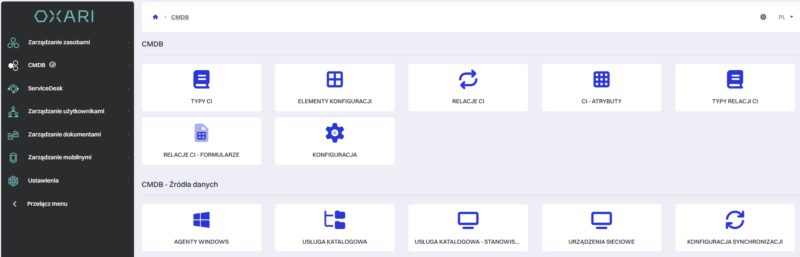
OXARI CMDB is a comprehensive solution that enables organizations to build a consistent configuration database tailored to their specific operational environment. You can define your own configuration item types and map the service structure to reflect how your IT environment actually operates. The system does not impose a rigid schema, allowing relationships between services, applications, and infrastructure components to be modelled according to your requirements.
By integrating the CMDB with the Service Desk module, you can link a ticket to a specific configuration item and identify which services may be affected by an incident or change. This simplifies problem diagnosis and supports faster operational decision-making.
Key features:
creation of custom CI types,
modelling of relationships and service structures,
inheritance of attributes and subtypes,
graphical and tabular visualization of relationships,
data import from multiple sources,
integration with Service Desk.
ServiceNow CMDB
ServiceNow CMDB is a core component of the ServiceNow platform and is frequently deployed by large enterprises. The system is based on the Common Service Data Model (CSDM), which helps structure service data and map its relationships with the underlying infrastructure. Its extensive configuration capabilities make it suitable for complex organizational environments.
The platform is designed to operate at enterprise scale. It can manage millions of configuration items, while Service Graph Connectors enable data to be imported from numerous external systems. However, implementing and maintaining such a solution requires an experienced team and an appropriate budget.
Key features:
business service mapping,
correlation of monitoring events with CIs,
support for very large numbers of configuration items,
Service Graph Connectors for data integration.
Device42
Device42 was originally developed as a data center infrastructure management tool and remains particularly effective at managing the physical layer of an IT environment. The system automatically discovers devices without requiring agents to be installed, making it possible to collect information about servers, networks, and applications quickly.
The solution visualizes dependencies between applications and services and maps detailed infrastructure data, including rack layouts and power consumption. It is especially well suited to organizations that require precise control over physical infrastructure and IP address management.
Key features:
agentless asset discovery,
automated application dependency mapping,
built-in IP address management (IPAM),
rack and infrastructure visualization.
Jira Service Management Assets
Assets in Jira Service Management is designed primarily for teams already using Atlassian tools. The system supports flexible object schemas, allowing organizations to record not only IT assets but also employees, contracts, locations, and other business objects.
The Jira automation engine can update data based on predefined rules and events, while direct integration with DevOps workflows makes it possible to link incidents and changes to specific configuration items. It is a suitable option for organizations that want to develop their CMDB within an existing Atlassian environment.
Key features:
flexible object modelling,
automated data updates,
DevOps integration,
linking tickets to configuration items.
BMC Helix CMDB
BMC Helix CMDB serves as a central repository for asset and service data across on-premises and cloud environments. The system consolidates information from multiple sources and updates it automatically through discovery tools and API-based integrations.
The solution supports advanced service modelling and can manage very large numbers of configuration items. It also enables organizations to monitor data quality using KPIs and analyse dependencies between components through graphical visualizations.
Key features:
automated updates from discovery tools,
data federation through APIs,
large-scale service modelling,
data quality monitoring,
graphical dependency visualization.
CMDB comparison – which solution should you choose for your organization?
The table below compares the systems using recurring selection criteria: data model flexibility, data update methods, dependency analysis, ITSM integration, and implementation complexity. This makes it easier to identify which solution best matches your organization’s specific requirements.
System
Data model flexibility
Data updates
Dependency analysis
ITSM integration
Implementation complexity
OXARI CMDB
Very high – custom CI types, inheritance, and relationships
Import from multiple sources
Graphical and flat views of relationships between services and assets
Native integration with Service Desk
Low
ServiceNow CMDB
Very high – CSDM and an extensive service model
Service Graph and ITOM integrations
Advanced service mapping and event correlation
Deeply embedded in the Now Platform
High
Device42
High – extensive physical infrastructure model
Agentless discovery
Automated application and dependency mapping
Integrations with ITSM tools
High
Jira Service Management Assets
High – open object model
Updates through automation and integrations
Relationships between tickets and objects
Native to Jira Service Management
Medium
BMC Helix CMDB
Very high – large-scale service model
Discovery and data federation
Visualization of CI and service dependencies
Part of the Helix ITSM platform
High
What problems does a CMDB solve, and which tool should you choose?
A CMDB primarily addresses the lack of visibility into what an IT environment actually consists of and how individual components affect service performance. Without a central repository, it is difficult to assess the impact of planned changes, identify the source of an incident quickly, or plan infrastructure development effectively. This can lead to longer service disruptions, higher operational risk, and unnecessary costs.
A properly implemented configuration database makes it possible to link assets with services, improve collaboration between IT and DevOps teams, and make decisions based on reliable data rather than assumptions. It is a natural extension of ITSM processes and a strong foundation for informed asset management. For this reason, when reviewing an Asset Management software ranking, it is worth considering CMDB solutions at the same time, particularly if you need a comprehensive approach.
In this model, solutions such as OXARI CMDB, integrated with ITSM and Asset Management modules, enable organizations to manage assets and services effectively throughout their entire lifecycle within a single system. OXARI also stands out for its fast deployment and relatively straightforward implementation.
FAQ – CMDB
A CMDB provides the foundation for structured IT infrastructure management. Below, you will find answers to the most common questions about implementing this type of solution.
Which CMDB software is the best?
The best CMDB software is the one that accurately reflects the structure of your infrastructure, supports relationship modelling between services, and integrates with your ITSM platform. The tool should be selected according to the size of the organization and the complexity of its IT environment.
Is a CMDB necessary for ITSM?
A CMDB acts as a central repository of information about configuration items and the relationships between them, which is why it is often described as the heart of ITSM. It is not always essential, but in complex environments it significantly improves control over changes and incidents.
How should a CMDB be implemented in an organization?
CMDB implementation should begin with an asset inventory and the definition of an appropriate data model. Relationships between services and configuration items can then be developed gradually. Integration with ITSM processes and regular data updates are essential to maintaining an accurate and reliable configuration database.
If you have any questions or want to see how the system will work for your company, take advantage of our free consultation.
30 days test period full functionality technical assistance own test environment automatic installer.