How to analyze time spent in applications across your organization
Analyzing time spent in applications provides visibility into how long employees use individual programs and which tools they rely on most frequently. This data helps organizations plan workloads more effectively, identify areas for process improvement, and make informed decisions that support team productivity. Learn how to monitor and analyze application usage across your organization.
Data dodania: 13/08/2026
Autor: Aneta Karcz
Udostępnij na:
Analiza czasu korzystania z aplikacji przez pracowników
What is application usage time analysis?
Application usage time analysis is the process of collecting and interpreting data on how employees use the software required for their day-to-day work. It covers user activity monitoring, time spent in individual applications, and other usage data that helps organizations assess work patterns and the effectiveness of their digital tools.
One component of this process is user activity monitoring, which provides insight into application usage and the amount of time users spend working with specific tools. This data can be used to assess workloads, identify inefficient processes, and improve task allocation. It also supports cost control, resource management, and more informed decisions about how work is organized.
How does application usage monitoring work?
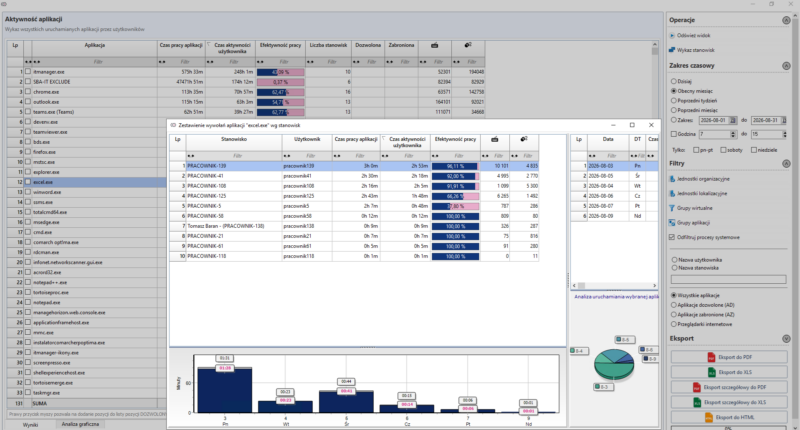
Application usage monitoring involves automatically collecting data on user activity, time spent in individual programs, and tasks performed during the working day. The data is transferred to a central system, where it can be analyzed and used to support areas such as remote management and the automation of workforce management processes.
The system may record:
time spent in individual applications,
work start and end times,
user activity throughout the day,
time allocated to specific projects or tasks,
data used to assess tool utilization and improve workforce planning.
It is also important to distinguish between several concepts related to working time records:
Time and attendance tracking – records when employees start and finish work.
Working time records – also include overtime, leave, on-call duties, and other information required under employment law.
Time and attendance system – a tool used to record working hours, such as an application, terminal, or badge reader.
Attendance register – confirms an employee’s presence but does not provide the same level of detail as an electronic time-tracking system.
Time and attendance tracking, working time records, and application monitoring – key differences
Solution
What data does it collect?
What is it used for?
Level of detail
Time and attendance tracking
Work start and end times
Recording attendance and hours worked
Basic
Working time records
Working hours, leave, overtime, and on-call duties
Maintaining legally required working time documentation
Extended
Time and attendance system
Data collected through an application, terminal, or badge reader
Automated recording of clock-in and clock-out times
Depends on the system
Attendance register
Employee attendance information
Confirming presence at work
Limited
Application usage monitoring
Time spent in applications and user activity
Analyzing work patterns and software usage
Detailed
Why should organizations analyze application usage time?
Organizations analyze application usage time to improve workforce planning and make better decisions about how available resources are used. The data shows which applications employees rely on, how much time individual tasks require, and where delays or inefficient processes occur.
The key benefits of application usage time analysis include:
better work organization – reports help identify the most time-consuming tasks and areas where processes should be improved,
less manual reporting – some application activity data is collected automatically, reducing the need for employees to prepare detailed daily reports,
easier project-based time allocation – collected data helps assign working time to specific clients, projects, and tasks,
improved resource planning – analysis supports workload assessment, bottleneck identification, and more effective task distribution,
greater operational visibility – reliable data makes it easier to make informed decisions about work organization and the use of business applications.
When used appropriately, this data can also support employees. It helps identify excessive workloads, improve task planning, and reduce the time spent on low-value activities. As a result, the organization gains greater control over its processes, while teams can work in a more structured and efficient way.
How to implement application usage time analysis in your organization
Successfully implementing application usage time analysis requires more than selecting the right technology. It also depends on establishing clear policies and maintaining transparent communication with employees. A transparent approach helps address concerns and encourages greater acceptance of the solution across the organization.
Step 1. Explain the purpose of the implementation
Before introducing the system, explain why the organization is implementing application usage time analysis. Make it clear that the objective is to improve work organization, support more effective workload planning, and enable accurate project-based time allocation—not to introduce excessive employee surveillance.
Step 2. Define monitoring policies
Employees should understand what data is collected and how it will be used. It is equally important to establish clear boundaries for monitoring and ensure compliance with applicable data protection and privacy regulations.
Step 3. Choose the right solution
The platform should provide application usage monitoring, comprehensive reporting, and support for both on-site and remote teams. Choose a solution that can be adapted to your organization’s requirements and scale as your business grows.
Step 4. Review the data and optimize processes
Collecting data alone is not enough. Regular analysis of reports helps identify opportunities for process improvement, optimize team workloads, and support data-driven decisions that enhance day-to-day operations.
Jak analizować czas pracy na aplikacjach w firmie
ITManager for application usage time analysis
ITManager is designed for organizations that need reliable insight into how applications are used across the workforce. The system monitors user activity, analyzes application usage, and generates clear reports that support workforce planning and business decision-making. It also provides remote device management capabilities and integrates with OXARI MDM, enabling administrators to manage computers, smartphones, and tablets from a single platform.
The solution supports productivity analysis, protects corporate assets, and streamlines day-to-day IT infrastructure management. Application usage data is only one part of the picture. ITManager combines usage analytics with device management and security controls, giving IT teams broader visibility and control across the IT environment. Explore the capabilities of ITManager.
FAQ – application usage time analysis
Below are answers to the questions most frequently asked about application usage time analysis.
Does application usage time analysis violate employee privacy?
Application usage time analysis does not have to infringe on employee privacy, provided it is conducted in accordance with applicable laws and employees are clearly informed about its purpose, scope, and operating principles.
How often can reports be generated?
Reports can be generated in real time or at scheduled intervals, depending on the organization’s reporting requirements.
What types of data can be analyzed?
The most commonly analyzed data includes time spent in applications, user activity, and information related to completed tasks.
Is application usage time analysis suitable for remote work?
Yes. Modern monitoring solutions provide visibility into application usage and user activity for both on-site and remote employees.
If you have any questions or want to see how the system will work for your company, take advantage of our free consultation.
30 days test period full functionality technical assistance own test environment automatic installer.