What is Asset Management and why do companies need it?
Asset Management is a comprehensive process of managing a company’s assets – both physical equipment and digital resources. It covers the full lifecycle of every component of the IT infrastructure, from purchase and configuration, through usage, to retirement. This gives an organization full control over the condition, location, and costs of its assets. A properly implemented system helps avoid chaos in records, optimize spending, and maintain compliance with legal regulations.
Modern solutions of this type provide precise reports, support investment decisions, and eliminate the risk of using outdated licenses. For example, using Asset Management in the medical industry makes it possible to maintain full compliance with security and business continuity requirements – crucial in environments where every minute of downtime can impact patients’ health or lives.
Criteria for choosing Asset Management software
Choosing the right Asset Management system is a decision that has a real impact on the efficiency of the entire IT department. This type of software makes it easier to control capital, analyze its effectiveness, and plan investments. Before choosing a specific solution, it is worth reviewing the key criteria:
- Flexibility – the best Asset Management systems allow full interface personalization, process alignment with company policy, and easy report creation. Flexible configuration speeds up responding to organizational changes without the need to deploy new software.
- Scalability – the system should grow together with the company. A scalable solution will handle an increasing number of devices, licenses, and users without performance loss, which is crucial for organizations planning expansion.
- Integrations – modern tools connect with CMDB, Service Desk modules, or ERP systems, enabling centralized data and automated information flows. This helps eliminate errors caused by manual data entry.
- Ease of use – an intuitive interface shortens implementation time and supports technical teams. Convenient asset search, clear dashboards, and automated notifications significantly speed up daily operations.
Ranking: 9 best Asset Management systems
A properly matched Asset Management system makes it possible to integrate IT infrastructure data with business processes. In the list below you’ll find tools that stand out for their functionality, advanced capabilities, and the ability to adapt to different types of organizations – from small companies to large public institutions.
OXARI Asset Management
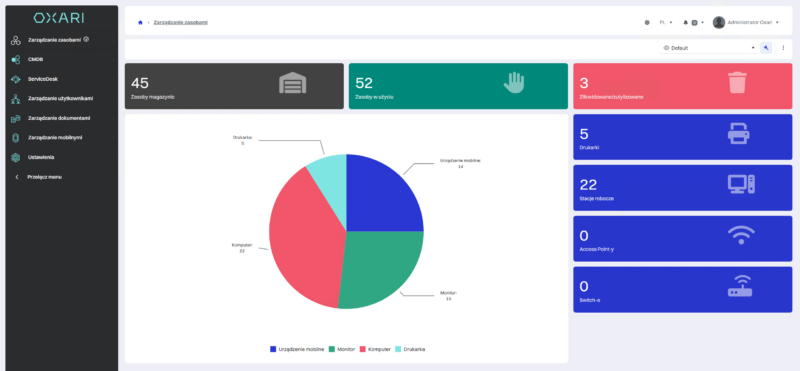
The advanced OXARI Asset Management system is designed for comprehensive IT asset tracking, aligned with ITIL and fully integrated with the CMDB and ServiceDesk modules. It streamlines not only computer hardware inventory, but also the management of virtually any assets – from office equipment to medical devices. A key advantage on the local market is Polish-language support and an implementation team working in Polish, which improves communication, speeds up problem resolution, and makes adoption easier – especially for teams that prefer working in Polish. The system automates asset workflows and allows you to create custom asset types and reports.
Benefits:
- Inventory and automated hardware auditing
- Generating handover, return, and decommissioning protocols
- Creating relationships between assets and tracking change history
- Integration with ServiceDesk and a document repository
- Report and email notification builder
- Ability to create automation rules
- Polish-language support and implementation team (service in Polish)
Challenges:
- Full implementation of all features may require time and technical support.
ManageEngine Asset Explorer
ManageEngine Asset Explorer is a flexible IT asset management solution available in both free and commercial versions. It works well for small businesses and large enterprises, enabling full control over the asset lifecycle and license compliance.
Benefits:
- Comprehensive tracking of hardware and software
- License management and demand forecasting
- CMDB integration and audit automation
- Intuitive interface and mobile app
Challenges:
- No self-service user registration and no geolocation
- Limited free plan and expensive add-ons for remote access
Snipe-IT
Snipe-IT is an open-source Asset Management system available on Linux, Windows, and macOS. It provides full asset lifecycle tracking and license control. It stands out for Slack integration, barcode support, and mobile-friendly use.
Benefits:
- Full asset history and fast auditing
- Custom fields and digital signatures
- Email alerts for warranties and licenses
- Intuitive web and mobile interface
Challenges:
- Manual data entry increases the risk of errors
- Limited scalability in very large organizations
- Requires advanced configuration and technical knowledge
Ivanti Neurons
Ivanti Neurons is an advanced system designed for mid-sized and large organizations. It provides full visibility of the infrastructure – from computers and servers to cloud and virtual assets. With real-time discovery and analytics, it improves response to changes immediately after new devices appear on the network.
Benefits:
- Remote management and barcode scanning via a mobile app
- Full asset lifecycle tracking – from procurement to retirement
- Built-in modules for contract and vendor management
Challenges:
- Complex configuration and a steep learning curve during implementation
Atera
Atera is a platform that combines Asset Management, remote monitoring (RMM), and a helpdesk system in a single SaaS solution. It uses its own AI model – Action AI – which automates responses to tickets and eliminates some first-line support tasks. With Network Discovery, administrators gain full visibility into network assets and potential security gaps.
Benefits:
- Automated patching and update scheduling
- Network security analysis using attack surface mapping
- Dynamic reports and infrastructure health charts
- Fast scanning of multiple subnets at once
Challenges:
- Insufficient technical documentation
- Limited mobile device management capabilities
Freshservice Asset Management
Freshservice Asset Management is an intelligent AI-powered ITAM solution that enables efficient management of on-premise, cloud, and SaaS assets in one place. The system automates the IT asset lifecycle, minimizes downtime, and supports real-time data-driven analytics. It works especially well for organizations that want to combine asset management with service operations.
Benefits:
- Full visibility of IT assets and automatic hardware discovery
- AI-supported asset lifecycle monitoring and automation
- Built-in reports and technology risk analysis
Challenges:
- Manual data entry can be time-consuming
- Limited scalability in large IT infrastructures
- Slightly outdated user interface
ServiceNow Asset & Cost Management
ServiceNow Asset & Cost Management is an enterprise solution for large organizations that require full automation of ITAM processes. It runs in the cloud and combines cost control with asset management in a single ecosystem, providing visibility across IT infrastructure, cloud resources, and SaaS licenses.
Benefits:
- Advanced ITAM for CAPEX and OPEX control
- Workflow automation based on the NOW platform
- Integration with numerous partner and cloud applications
Challenges:
- High implementation and maintenance costs
- Complex configuration and a steep learning curve
- Hidden licensing fees
Matrix42 ITAM
Matrix42 ITAM centralizes management of all IT assets in one place by integrating data from Service Desk, Software Asset Management, and CMDB. The system automatically discovers new assets and monitors their dependencies, ensuring full compliance and control over the IT environment.
Benefits:
- Full inventory and ITSM integration
- Automated dependency mapping and relationships between assets
- Contract management with deadline notifications
- Streamlined IT processes and audit readiness
Challenges:
- Limited advanced reporting capabilities
- Complex, slightly outdated interface
- Longer loading times in some environments
OpenText
OpenText is a comprehensive enterprise-grade platform focused on data security, information management, and AI-powered process automation. It helps organizations integrate data assets across the enterprise, ensuring regulatory compliance and high scalability.
Benefits:
- Advanced encryption and data protection mechanisms
- Built-in compliance with industry and legal standards
- AI integration in analytics and operational processes
Challenges:
- Time-consuming learning curve
- High implementation and maintenance costs
- Occasional performance issues and slow response times
What’s the difference between ITAM, EAM, and DAM? A practical comparison
| Category |
ITAM (IT Asset Management) |
EAM (Enterprise Asset Management) |
DAM (Digital Asset Management) |
| Scope |
Managing IT assets: hardware, software, licenses, and contracts. |
Comprehensive management of physical enterprise assets – from machines and vehicles to infrastructure. |
Managing an organization’s digital assets such as graphics, videos, documents, and marketing content. |
| Core functions |
Inventory, hardware auditing, CMDB, asset lifecycle automation, Service Desk integration. |
Maintenance planning, service schedules, cost control, equipment performance analysis. |
Storage, cataloging, and distribution of digital assets, CMS integration. |
| Business goal |
IT cost optimization, license compliance, full visibility of infrastructure. |
Extending the lifecycle of physical assets, reducing operating costs. |
Streamlining marketing/creative workflows and protecting copyrights. |
| Integrations |
CMDB, Service Desk, ERP, security systems, and AI (e.g., OXARI Asset Management). |
ERP, manufacturing systems, IoT, SCM (Supply Chain Management). |
CRM, CMS, content editing and publishing tools, cloud. |
| Target users |
IT departments, public administration, healthcare, large organizations. |
Industry, logistics, energy, maintenance, urban infrastructure. |
Marketing, PR, creative agencies, e-commerce, media. |
| Business benefits |
Automated hardware/software management, compliance, full control over IT assets. |
Reduced downtime, better maintenance planning, optimized operating lifecycle. |
Faster asset search and sharing, shorter content creation time. |
| Costs & deployment model |
On-premise or cloud licensing; implementation typically 2–6 weeks, scalable (e.g., OXARI, ServiceNow). |
High implementation and maintenance costs; long-term deployment, often ERP integration. |
Flexible SaaS/cloud model; fast implementation and low operating costs. |
Which Asset Management software should you choose? A guide for companies
Choosing the right Asset Management tool depends on the scale of the business, the organizational structure, and the maturity of IT processes. Some companies need a simple tool to register hardware, while others require an integrated ITAM environment with CMDB and Service Desk. In every case, automation, compliance, and the ability to grow are key.
For companies starting from scratch
For organizations without a previous asset register system, the best choice is software that is easy to implement and intuitive to use – such as Snipe-IT or Atera. They enable a quick start, automatic asset discovery, and basic reporting without advanced configuration. This is a good first step toward full control over IT infrastructure.
For companies with an existing Service Desk
If a Service Desk system is already in place, the best approach is to integrate it with an ITAM module, such as OXARI Asset Management or ManageEngine Asset Explorer. By connecting to CMDB and automatically assigning assets to users, the company gains a complete infrastructure view and a simplified data flow between departments.
For hybrid or field teams
Mobility and remote work require tools that can be accessed from anywhere. Ivanti Neurons and Freshservice work best here. They provide real-time asset visibility, mobile barcode scanning, and remote device management. For distributed organizations, this ensures continuity and security of work.
For organizations with audit and compliance requirements
Companies in finance, the public sector, or healthcare need solutions with full asset lifecycle traceability, reporting, and access control. Systems such as ServiceNow Asset Management or OXARI Asset Management provide legal compliance, advanced analytics, and audit functions aligned with security and ITIL standards.
Among the most universal solutions, OXARI Asset Management stands out – offering full configuration flexibility, local implementation, and ITIL alignment – along with ManageEngine Asset Explorer, which, although slightly more expensive and more complex, provides a broad feature set while maintaining fast operation and strong integration capabilities. Both systems work well for large organizations as well as for companies that are still developing their IT processes – however, in demanding environments such as medical facilities or public administration, OXARI Asset Management has no equal.
FAQ – most frequently asked questions about Asset Management
Implementing an Asset Management system is a new stage of managing IT infrastructure for many companies. Before choosing the right solution, it’s worth reviewing the most common questions and short answers that will help you make the right decision.
Which Asset Management software should you choose for a large organization?
Enterprise-class ITSM systems work best, such as OXARI Asset Management or ServiceNow – scalable and aligned with ITIL.
Which features are the most important in a modern ITAM system?
Automated inventory, reporting, integrations with CMDB and Service Desk, and license control.
Is it worth investing in paid systems if free options exist?
Yes – paid solutions provide stronger security, more automation, and professional technical support.
What are the costs of implementing Asset Management?
From a few thousand to several dozen thousand PLN, depending on the number of users and the deployment model (cloud vs on-premise).